

Popular Path heatmap
A Popular Path heatmap shows the most-walked routes through the store — where customers actually move, not just where they stop. Red traces are the busiest paths; cool traces are rarely-used routes.
A Popular Path heatmap shows the most-walked routes through the store — where customers actually move, not just where they stop. Red traces mark the busiest paths; cool traces are rarely-used routes.
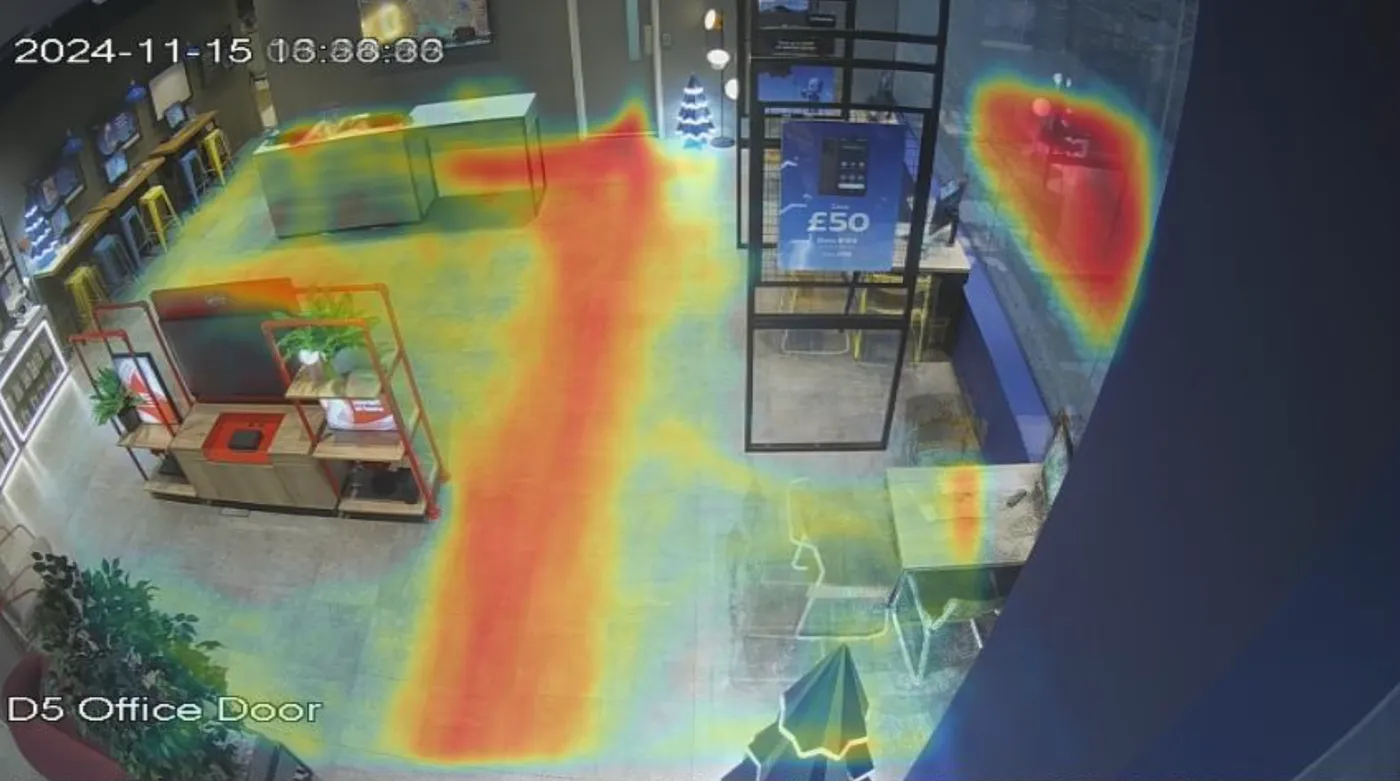
How it’s plotted
Aura Vision aggregates the routes every customer walked across the period you select. Each customer’s path contributes to the heatmap; the more customers who walked the same route, the redder the line.
What it’s useful for
- Layout decisions. See whether customers follow the path you designed or carve a different desire-line through the store.
- Sightline gaps. A merchandising zone that’s logically positioned but rarely walked past usually has a sightline or signage problem at the prior decision point.
- Wayfinding. Confirm whether new signage or fixtures shifted the dominant route after a refit.
- Underused floor space. Cool regions next to high-traffic routes are candidates for promotional displays or re-purposing.
How it differs from a Total Time heatmap
- Popular Path weights movement: where customers walk.
- Total Time weights dwell: where customers stop.
A pinch-point near the entrance will show on Popular Path even if no one stops there. A destination display will show on Total Time even if it’s off the main route.